Redirect URL 6 common mistakes made
Redirect URLs are often part of the development of a website. Sometimes there are errors that can affect the traffic and rankings of websites. You can create relevant service blog post today. But maybe at some point in the future it doesn’t make sense to keep it alive. So what is redirect? What are the common mistakes that website owners make? The following article will help you answer the above questions.

Table of contents
What is Redirect URL?
Redirect URL is called redirect, is a way to forward one URL to another.

Example: Suppose that you sell widgets and have multiple pages:
- example.com/products/widgets
- example.com/products/blue-widgets
- example.com/products/white-widgets
If you don’t just sell blue or white widgets anymore, or you want to combine all the pages into one, you can redirect the blue and white widget pages to your main widget page.
This makes it possible for users to return to the homepage quickly, and web owners only need to focus their optimization on the main site.
You can choose to use multiple redirect types like 301 , 302, 307, 308 redirects . And you can implement redirects using meta refresh, JavaScript , HTTP headers and others.
6 URL redirect errors that affect website traffic
Each type of URL redirect or method used to redirect can be beneficial for your website traffic and SEO .
This is one of those areas where even a simple mistake can have huge consequences for your website traffic.
1. Redirect everything to your homepage
If you are redirecting the URLs of pages to your homepage in an attempt to increase your ranking, this will do you more harm than good. Google’s John Mueller said this a few years ago:
“Redirecting everything to the homepage is a really bad practice because we lose all the signals associated with the old content.”
He explains that when multiple pages redirect to your homepage, it’s a potentially risky move for search crawlers.
What could happen?
Google won’t see all the positive signals you’ve built on old URLs, and that content’s value is also lost.
2. Infinite loop of redirect URL
The redirect loop can be easily avoided by testing every new redirect. These loops happen when you redirect URLs to pages like this:
Page 1> Page 2> Page 3> Page 1
In this case, the redirect URL will take the user back to page 1 and sometimes it will show the incoming website error to the user. And as a result, the user will not be able to access the old or new page again. From a search crawler perspective, pages on your site may be excluded from the indexing list or the indexing system. Because the crawler doesn’t know what’s going on.
This will cause you to face a huge loss of revenue if this website is the main source of lead generation or generating a lot of traffic for the website.
3. Submit crawler via redirect URL string
Do you want to lower the user experience and affect your website rankings? The creation of redirect chains is often common in some companies or departments with many people working on the same website.
How?
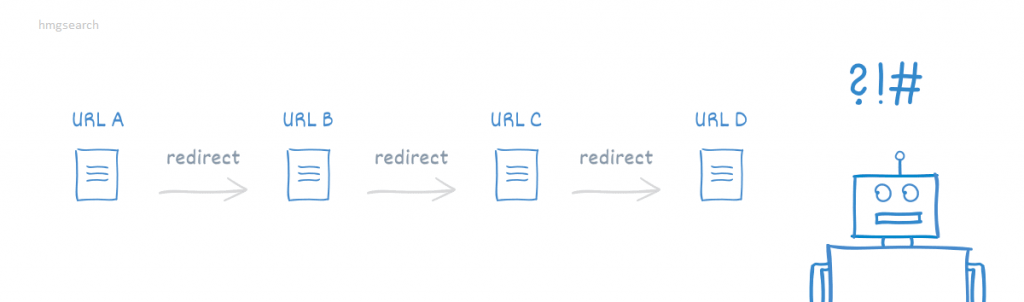
Multiple redirects take place in a chain.
Eg:
- /about is redirected to /aboutus
- /aboutus is redirected to /ourcompany
- /ourcompany is redirected to /aboutourcompany
You want to create a single redirect from /about to /aboutourcompany to avoid possible redirect chains:
- Website speed is slow.
- Increase bounce rate.
Tip: If you go down to tip 6, you’ll find a surefire way to avoid these redirect chain nightmares.
4. Forget case-sensitive
Thankfully , John Mueller said “URLs are case sensitive, but pick whichever you want.”
But if someone types your URL into a browser, they won’t remember whether you’re uppercase or lowercase. People will keep URL lowercase.
There are many ways to create redirects, but a lot of people use .htaccess on Apache servers.
For example, you can redirect the following page URL without being case sensitive using:
Redirect 301 /about http://www.domain.com/about-new [NC]
And if the person enters “About, about, ABout” or any other combination of cases, they will all redirect to “about-new” with no problem.
5. Use 302 redirects instead of 301 redirects
Are you planning or already using 302 redirects? Shouldn’t it be a 301 redirect instead?
Many website owners don’t think it matters what type of redirect they use because Page A is still being redirected to Site B.
But these website owners are wrong.
301 redirects are permanent

Do you want to let search engines know that redirect URLs are permanent ? If so, use a 301 redirect.
The SEO value of the original page or web page is preserved and the original page or page stops being indexed.
302 Redirects are temporary
The 302 redirect says “Hello Google, this page is temporarily redirecting but will be back up soon.”

You want to use these redirects when you are temporarily on the move. For example, when you are testing a new design or taking users to a new page.
You’re telling the search engines that the page will be live again, so it will:
- Retain all page ratings.
- Still indexed.
The new page you are redirecting to will not receive any links of the original page.
So what should you do?
If the page will be back up soon, use a 302 redirect. Otherwise, a 301 redirect is ideal.
If a 302 redirect is kept for too long, search engines like Google may consider it to be a 301 redirect indeed.
6. Do not track your redirect URLs
If you have a business website, hundreds or thousands of pages, or work with multiple SEO professionals, you should create protocols for tracking changes to your site.
Why?
You need waypoints to track the changes that have been made so that you can analyze and decipher which changes led to an increase or decrease in traffic.
Since redirect URLs can be done at the page or server level, it is essential to keep track of them.
You can open your .htaccess file, not see a redirect for a certain page, and think it’s in the wrong place.
Someone else on your team may have used JavaScript or refreshed the meta on the page, causing the redirect loop.
Tracking your redirects helps current and future SEO professionals avoid common redirection issues that can affect your site’s traffic and revenue.
You should also set protocols that require all new redirect URLs to be tested and verified to ensure that they work properly.
End
Website URL redirection is a powerful technique that helps shape your traffic and can be used to improve user experience.
Avoiding the key mistakes above can help you avoid costly, time-consuming problems in the future. You can also visit Top On Seek ‘s blog for more information.


Comments
Post a Comment